the hearts and laserbeams blog!

recently blogger decided we can't publish my blog to my own website anymore so here we are! pardon the dust, and please visit us online at www.heartsandlaserbeams.com!

hearts and laserbeams is the wacky good-times art and design by me, steph calvert. i team up with robots, cupcakes, and stick people to show people art isn’t all about seriousness, missing ears, and deep thoughts; it can actually be tons of fun.

5.28.2009

my long beach tech support heroes...

ok so about a week ago, mysteriousness was afoot on my laptop. i'm not sure what the eff happened with my norton antivirus, but all of a sudden it started freaking out and repeatedly asking me to activate my account (which i've had for at least 2 years). so i got online with norton tech support and through the wonders of remote desktop magic or voodoo or something they were able to uninstall and reinstall my copy of norton antivirus.

so it seemed like things were awesome. and then my laptop decided it wanted an immediate divorce from the internet. no trial separation, just straight get the fuck out my house. as someone who does quite a lot of freelancing over the internets, it was like putting me in stephen king's misery house and hobbling the shit outta my operation... the process became do work on my computer that has all my files, save the stuff to show the clients onto a usb flash drive, take that to the huzz's computer, email the files that way, and if a client sent something to me reverse the process.

basically i was about to jump outta the window. or worse have my wallet raped by the best buy geek squad.

so today i did some searching on craigslist trying to see if there was someone that looked reputable enough to trust the goods with. and while i did see a couple of ads that could possibly be legit people that don't wanna steal from me... i still couldn't get behind the idea of handing my laptop over to a stranger for at least a day, expecting to get it back with no hassles (if i could get it back at all!)

i decided that for once i should have some standards, look for ratings, reviews, whatever. and that is how i found quickfix. they were the only guys i saw on google maps that had 11 ratings that all seemed pretty positive, so i gave em a call. (while crossing my fingers and hoping for the best.)

and without bringing my computer in or charging me, they tried a bunch of things with me over the phone to try and get this thing to work. and when none of that did and we had thoroughly discussed how my computer got to the point, they said ok i think you're gonna need to bring it in.

and as i drove to 3397 east 19th street in signal hill, i racked my brain as to how long i could possibly work without my computer. and what dollar amount was i willing to spend to get this issue fixed?

turns out neither of those extremes happened. i walked in, they were super helpful, fixed it on the spot in the span of about 15 minutes, and charged me 25 bucks. TWENTYFIVE BUCKS. and they also threw in some pointers about things i could do to make my computer run a little better, AND installed avira virus protection freeware after making sure all the little nasty bits of norton antivirus that had kinda put me in this position were gone.

long story short, I HEART QUICKFIX. and i wholeheartedly recommend em, and if my computer effs up again that's where i'll go. the end!

Labels:

5.16.2009

hearts and laserbeams book report: the jungle by upton sinclair

ok so i figured i'd do another high school reading list selection this time, and i went to the barnes and noble classics section at uh... my local barnes and noble to see if anything caught my eye and dragged me fifteen feet. ended up walkin out with the jungle - wasn't sure i'd wanna read it, cuz from what i knew about it, there's some pretty graphic nasty talk about how our meat used to be handled back in the day. but then i read how this book was a milestone in american history, and that because of this book the pure food and drug act was passed. so i thought i'd give it a go - make sure you read to the end to see how to get my copy of the jungle and the cliff notes for it for free so you can read it for yourself!


hearts and laserbeams book report: the jungle by upton sinclair


dude did you ever see the snl skits about debbie downer? like there's a big group of happy people hanging out and they're talking about cool stuff and then debbie downer pipes up with some shit like "I'll tell you what the Pilgrims did bring: smallpox."


seriously, that's what this whole book is. it's a big fat huge debbie downer. it pretty much made me wanna kill myself in a lot of parts. (not really. but it DID make me want to drink)


so basically the jungle is not all about the meatpacking industry - that's a tiny part of it that really only takes up a couple chapters of the 400 pages. the overall story is there's this poor lithuanian family who comes to america in the early 1900s to make a better life for themselves.


and they get crapped on over and over and over and over and over. by the end of the book, a couple of em are dead, one of em's run off and abandoned the family, the kids are all effed up, one of the family's a morphine-addicted ho, the list goes ON AND ON.


you just keep reading about how crappy everything is, how everything's a swindle, everyone's out to rip everyone else off, everything's a lie,and holy crap guys this book was super depressing. cuz we are jerks!!!


and then i got to the last few chapters of the book and had lots and lots and lots of problems finishing the book because it was all politics. you know how i am about politics - SNORE!!! i honestly couldn't really tell you much about it except for the fact that the main dude jurgis finds out about socialism and it solves all his problems the end!


say it with me now - WHAAAAAAAAAAAA???


so as i'm reading the cliff notes on this thing, it turns out the jungle is only partly about the meat-packing district and all the bad tuberculosis infested meat being churned out back in the day. the entire book is about how capitalism stinks, and how it fucks up everyone that isn't top dog and how it's all corrupt, and how awesome socialism is.


and upton sinclair was a socialist! and he ran for governor in california as a socialist a couple of times!


WHAT THE EFF!!! how come i never heard about this part of the book? (if i'd have known it was all about politics i would've just rolled over and taken a nap instead) apparently when the book came out mr sinclair the social socialist was pretty upset because the whole socialist slant of the book was lost in the OMG WHAT THE EFF ARE THEY DOING OVER THERE IN THE MEATPACKING PLANTS!!!


so basically, here's the book in one sentence: the jungle isn't so much about bad meat as it is about bad politics. it's pretty riveting though, and until i got to the last 3 chapters that were all about socialism it was pretty much a page turner!


ratings:

hearts:
3 hearts - this wasn't my favorite book to read, it was pretty depressing and the last 3 chapters could be lovingly called "boring as all hell"

farts: 2 farts - it was actually pretty good, didn't so much like reading about diseased meat and REALLY didn't like reading about politics.


and there you have it! wanna check out the jungle for yourself? i'm givin away my copy along with the cliff notes to the first person to comment about this blog post! be quick, though - i post my blog on 5 different sites so the first one from any of them wins!

Labels: ,

winner winner chicken dinner!

thanks to the awesomeness of random.org, the winners for the screenprinted tee and greeting card giveaway have been picked!

congrats to kb of kokoleo for winning an awesome tee, and to dao for winning a greeting card!

there's gonna be lots more giveaways in the coming weeks so stay tuned! (i may have a quickie one coming up later today even for you book lovers out there!)

Labels: ,

5.10.2009

the voodoo that yudu so well - part 2: all the screens that're fit to print! AND A GIVEAWAY!

now that we've covered how to burn screens with the yudu, i'm gonna share my experiences today in printing a big ol pile of shirts for an order i'm putting together for shopscad in savannah, georgia! there's a lot of info to cover, but if you can hold on til the end i'll tell ya about a fun giveaway we're gonna do!

first up you start with a big ol pile of shirts and a few fabulously burned screens!

P1050630 P1050619

you'll wanna iron your shirts before printing on em so there's no weird wrinkles in the design, fyi be advised!
P1050634

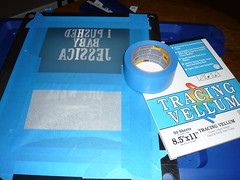
first of you'll need to prepare the screen by taping off all the areas you don't want ink to get through. i use ordinary 3m blue painters tape for masking off stuff because it's not super sticky and comes off really clean when you need to take the tape off. also, notice that i burn more than one image onto a screen - thisll save you a ton of money in the long run - figure a yudu screen is 25 bucks - if you put 4 designs onto 2 screens you've effectively saved yourself 50 bucks! such a smart shopper! you can use vellum, plastic, acetate, or heavy paper to block off designs you don't want to be part of your current printing. i use vellum. so if you wanna be awesome... uh... use vellum?
P1050637

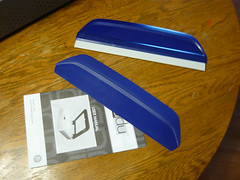
i would also totally recommend springing for yudu's better squeegee. it just feels better with printing. i'm willing to bet if you already do screenprinting you've got a squeegee you like and i'll be honest with you that shit will work. it won't make the yudu blowup! so relax!

money saving tip: i think the yudu means well with their platens you can buy a bunch of and adhesive sheets, but for my one-color printing uses i find it kind of unnecessary. i left the protective sheet on top of the platen's adhesive and i don't put the platen inside the tee when i print. rather, i put a piece of cardboard inside the tee and set it on the platen and print away. here's some info on lining up your images:

P1050638

see that dark shape behind the "i pushed" text? i put a piece of tape on the platen to mark where the top of the artwork is.

P1050641

then i jot down on the tape the measurement info on what points i want the tee to line up to to have proper placement. if you're only doing one color stuff, the registration isn't super important at all - if you're planning on doing more than one color, definitely look into the yudu's registration sheets and whatnot...
P1050642

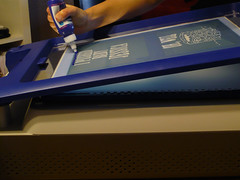
get your bead of ink across the top of the design and get to printin!

P1050644

it's a good idea to test print a couple of times on paper beforehand to make sure everything's gonna go to plan...

P1050645

money saving tip: you'll need to put ink at the top of the design again with almost every pulling of the print - if you look at your squeegee you've probably got a lot of excess on there that you can scrape off with a popsicle stick and put across the top of the design instead of using another bead of ink from the bottle!
P1050650

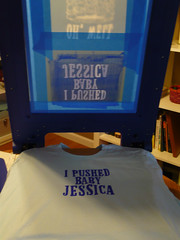
and POW! before you know it, you're done printing your first tee!

P1050656

and POW POW!!! before you know it, you're done printing a whole mess of tees! one of the things i love about the yudu is it really really helps me production-time-wise. printing tons of shirts used to take forever, but i did 60 tees in 6 hours today! that includes printing, stamping a logo inside at the neck and heat setting each tee individually. you really can't beat that!

P1050657

i ran into a tiny problem with another screen of mine - the transparency was too high up on the emulsion when i exposed the screen, and part of the apostrophe got cut off!
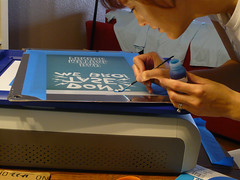
P1050660

no worries though, i busted out a tiny paintbrush and the yudu's screen blocking stuff and fixed it right up! i will tell you i think i may try speedball brand's screenblocking fluid in the future, because the yudu's seemed to wash out when i cleaned the screen later...
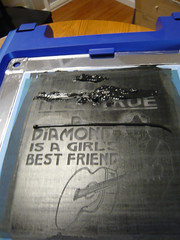
P1050663

if you have a larger tee design, it may be good to put a bead of ink across the top of the art, and then another bead of ink across the middle just in case!

potential problem alert! ok i did find one thing with the yudu that was giving me some issues this morning. it seems like some screens don't wanna stay on their pegs and they shift slightly. you don't believe me? here's proof!

P1050665 P1050665

it's really not a huge deal for me because i do all one-color desigsn for now. BUT - i kept getting subtle double fingers from my neil diamond screen! maybe it's too close to the edge of the emulsion? i dunno!

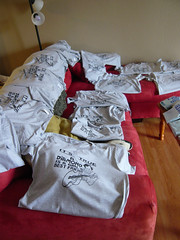
P1050667

P1050669

printing these neil diamond tees i can now tell you the 2oz bottle you receive with your yudu machine will be enough for about 16 large graphics. if you're using it for tiny graphics you'll get more for the money...

but what would be even better for the money is using a different brand of screenprinting inks... i kept reading everywhere that you are really only supposed to use yudu brand inks with this system. but they're so flipping expensive! i started thinking about how i've always used speedball fabric screenprinting inks, and how they're water soluabe just like the yudu inks... and then this happened:

P1050672

and i felt like i should probably give it a try and report back!

P1050674

and survey says DING DING DING! the tees i did with speedball ink turned out just as good AND rinsed out of the screen just fine at the end! hooray!

ok so if you're using more than one design on a screen, how do you line up the bottom image when you wanna print it?

P1050678

i do the same thing as with the top graphic - i put a piece of tape to mark the top of the artwork -
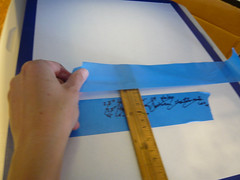
P1050681

and then i measure out where i want the shirt to line up in comparison with that top of the artwork. make sure this piece of tape is long enough so you can se it on the side of your tee when you're placing it on top of the platen!

P1050685

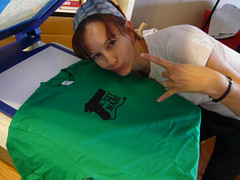
here's my classic steph's screenprinting pose! if you press your left arm down on the end of the screen and really lean into your print as you're pulling the squeegee across you'll get a nice amount of pressure and a crisp clear print. i like to pull my squeegee across twice so it's nice and dark!
P1050688

check it out! i effing love this glue gun design and i've been wanting to burn a screen of this for ages - if you like it make sure you read to the end of this novel-length post for info on an awesome giveaway!

once i did one of those glue gun tees, i wanted to print that graphic on EVERYTHING! i'm not one for texty tees so i put tape over the words on the back of the screen and slapped that design on one of my sweatshirts!

P1050694

and then i went for the yoga mat!

P1050697

P1050701

but due to the texture of the mat and the thin quality of the speedball ink i used, the design came out really smudged on the yoga mat. i recommend on highly textured non-clothes stuff it may be better to use the yudu inks cuz they're a lot thicker.

P1050708

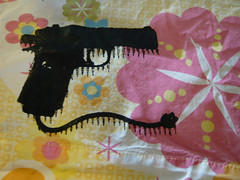
and all that smudging went up on the back of the screen, too - something i didn't think about until i tried screenprinting a pillowcase with the glue gun design...
P1050710
(i still kinda like it though!)

and THEN i put it on a tee using the yudu gold metallic ink! i don't know if speedball has a shiny gold and silver fabric ink but if they don't the yudu brand is totally worth it!

P1050717

and THEN i made some of these notecards! i think they'd be fun invitations if you're planning a crafty party night a your house - or if you're in a craft mafia chapter (like me!) and you're inviting new members to join they'd also be super cute!

P1050702

and THEN i screenprinted my dog! i think it turned out pretty good, check it out:

P1050703

and that about does it for my adventures with the yudu today! it's time to talk CONTEST! first place gets the kelly green "get made" tshirt pictured in this blog post - i only have one available right now in an american apparel unisex size small, so if you don't wear that size and you win you can maybe give it to a friend or bake it into a pie! second place gets a turquoise "get made" greeting card!

here's how it works - this'll be a random drawing, and there's a few different ways to get chances to win, and you can participate in more than one of these to get extra chances:

1) comment about this blog post!

2) twitter a link to this blog post and send me the link as proof

3) post a link to this entry on your blog and send me a link as proof

4) write a haiku about screenprinting in the comments of this post

5) share a link to this blog post on facebook or myspace and send me a link as proof

you've got until friday may 15th at midnight so get cracking and have fun! winner will be chosen from random drawing and will be notified via email! GOOD LUCK!

Labels: , ,

5.09.2009

that voodoo that yudu so well - part 1, how i learned to stop worrying and love the yudu

ok i'm really bummed that i JUST found my camera that's been missing for a week or more - i wanted to photodocument getting to know my yudu better! it was gonna be perfect... photos of us taking long walks on the beach, romantic candlelit dinners, canoodling at the movies - but instead you get just boring old stupid words!

except sometimes my words have been known to be at least a little entertaining.

but still. the plans i had for the pictures.

ugh. i'm buildig a bridge and getting over it!

so as i mentioned before, my superawesome amazing faboo rad honkytonk husband josh surprised me (us, we're sharing it, i keep forgetting that!) with one of those spanky new fancy yudu machines a couple of weeks ago! and i was so busy getting ready for Unique LA and workin on freelance projects on top of freelance projects that i juuuuuust got to crack that baby open last night!

i have to tell you that i've done the regular way of screenprinting before, and i was a tiny bit skeptical the first time i saw a yudu. it's by the same people that brought you the cricut, which is great for scrapbookers but not so much for people that wanna make their own die cut designs... i don't wanna be rude but my first impression was i kinda thought that it would be a very lowest common denominator type thing that would make low quality stuff for folks who just don't wanna be bothered with learning how to really screenprint. then i saw the yudu display at michaels, and started reading labels and kinda learning more about it, and had to tell josh very sheepishly "uh hey i know when you mentioned it i said it was dumb, but, uh, i kind of really super want a yudu. like really bad. so uh... sorry, and my birthday's coming up in july hint hint"...

and he ended up buying it early thank god! so far i am a total screenprinting convert and i'll tell you why:

1) shit on the yudu is all the same steps as traditional screenprinting but easier (once you get the hang of it). there's still emulsion and darkroom scenarios, but it's less time consuming!

2)if you mess up on burning a screen, it doesn't take a crapload of work and scrubbing to reclaim your screen - it takes like a minute. in your kitchen sink. while you hum to yourself. i have old-school wood frame screenprinting screens that haven't turned out right (from like YEARS ago) that i still haven't reclaimed because it's a huge pain in the ass!

3) as far as i can tell so far, the quality of the actual screens and supplies isn't inferior to old-school screenprinting. they say don't use any other inks but yudu inks, but i did find a website that tested using riso inks (like for the gocco) on the yudu screens and it worked fine. and they're cheaper. i'll be testing using the speedball fabric screenprinting ink i normally use in the future, will letcha know how that goes!

if you've never seen a yudu before totally check out the demo from handmade detroit, it's a good one!

so here's how burning the screens for the first time worked out for me: i burned some screens after watching the demo video and following yudu's specific directions and none of those screens turned out right. i reclaimed the same screen like 3 or 4 times. and then i got tired. later i came back to it, tried a few different things, and EVERY screen came out effing perfect.

so without further ado, here's my tutorial tips on how to prepare the perfect yudu screenprinting screen for exposing!

1) mood lighting: keep your lights dim the entire time so you don't forget what you're doing and ruin your emulsion sheet! i wrecked one by going into the kitchen to get something and flipping on a light - FAIL!

2)wet it and forget it: forget about the "dont get the screen too wet" part of yudu's instructions. i ran my screen under the kitchen faucet from the front and reverse side. then i wipe off the extra drippy water from the metal screen edges.

3) lay it on me sistahpants! so now (IN YOUR DIMLY LIT ROOM!!! NO DIRECT LIGHTING!) take your emulsion sheet and peel the plastic sheet off the side that comes off easy - then put it sticky side down on the back of your screen (the flat side), being careful to center it as you lay it down. (can't tell which is the sticky side? lick your finger and touch a corner, you'll figure it out real quick!) run your squeegee down it lengthwise, and then widthwise making sure to press out all the air bubbles.

then comes my special trick to make sure it's wet enough - holding it in your hand, look at the screen from the opposite side. lightly lightly spray that other side a couple of times with a water bottle, and run your squeegee once lengthwise along the screen. (from that side you just sprayed).

at this point, the green emulsion should look really even on both sides. if you've got any areas that look splotchy (they call it spiderwebby) you're not going to have a good end result. it should look really good and clean and even after doing my special trick. if not, try misting it again from that reverse side.

note: if your emulsion looks effed up before you dry it and expose it, you will end up with a bad screen. best to try again with a fresh sheet instead of going through the whole process to find out later it didn't turn out how you wanted it.

also note: drying time for my techniques is significantly longer than following yudu's instructions to the letter, but the results have been great every time.

also also note: your mom called and told me you're out of the family. sorry!

so the rest of it is business as usual following yudu's instructons:

4)dry that shit! after your emulsion looks lovely, put that screen in the drying rack and run the fan on it! using my method with more wetness involved, i think i averaged three to four 20-minute dry cycles before the screen was dry enough for exposing. you'll know when it's dry enough when it looks really even (and not wet at all) on both sides. test it by picking the plastic backing off the emulsion in a corner and peeling a tiny bit of it off. if it comes off really easy you're done! if it doesn't DON'T FORCE IT! put that thing back in the dryer and let it dry!

5) picture perfect pictures! ok one thing i tried from my old-school screenprinting techniques is i ran outta yudu transparencies, so i used vellum instead to print my image on. and i don't know if it was because that was a screen i did at like 2am and i think i messed up a bunch of things or what, but the vellum did NOT work at all. so don't do it! i do really like the yudu brand transparencies - they have a little bit of a tooth to em, so the images don't get all smeary when they come outta my inkjet printer.

from that point on i did pretty much everything to yudu's specifications - exposed the image for 9 minutes instead of 8 cuz i like to go the extra mile just to be sure, rinsed out the screen with cold water, and every one i've done since i started following these techniques has come out AWESOME.

oh wait one more thing. when you're done burning your screen and you've rinsed the unexposed green gunk out, i don't think it's necessary to use the yudu's fan for drying it. if you've got the time just blot off the excess water and set it up against a wall for a bit to dry. if you don't got the time hairdryer that shit!

another exciting thing i wanna share about the yudu is that i have a graphic i designed like 4 years ago that i've tried burning to screens the old fashioned way like 4 or 5 times with zero success because the line work was a little fine and frankly i'm not the best screen-burner in town. but following the above techniques i was FINALLLY able to get a clean burn of that image onto the screen and i am really effing excited about that! because it's pure comedy and it makes me chuckle!

so anyways, that's it for tonight - i'll be testing out the printing tomorrow, and like i said i found my camera so expect to see pics of the screens i burned and the printing process! pow!

Labels: , , ,