the hearts and laserbeams blog!

recently blogger decided we can't publish my blog to my own website anymore so here we are! pardon the dust, and please visit us online at www.heartsandlaserbeams.com!

hearts and laserbeams is the wacky good-times art and design by me, steph calvert. i team up with robots, cupcakes, and stick people to show people art isn’t all about seriousness, missing ears, and deep thoughts; it can actually be tons of fun.

3.29.2009

hearts and laserbeams book report: derby girl

i got this book for valentines day from the huzzzzz - what can i say the boy knows me!

for those of you that don't know, josh and i manned a hearts and laserbeams booth in the vendor area of a couple of l.a. derby dolls matches last year. then we went with some friends to see a multi-game roller derby extravaganza put on by the oc rollergirls last march, and when we actully saw a match we were hooked. hooked may not be the word. but full-on obessessed may be a little strong... anyways, moral of the story is we had to stop getting booths at the derby dolls games because all we want to do is watch. and drink beer. roller derby is the fucking bomb!

derby girl is a novel written by shauna cross, who used to skate for the l.a. derby dolls under the name maggie mayhem. according to the inside cover of this book, she "is obsessed with flea markets, the art of the perfect cd mix (even though cds are so over), and pretending she still lives in her hometown of austin texas."

i would also like to add to this that she likes long romantic walks on the beach and candlelit dinners from mcdonalds but i don't actually know her so i'm not for reals adding that at all.

according to my extensive research (i.e. josh mentioned he thought this might be the case and then i double checked imdb which never lies), this book is where the story for the upcoming roller derby movie whip it came from, with the screenplay also written by shauna cross!

hearts and laserbeams book report: derby girl by shauna cross

ok i got through this book in one day because i couldn't stop reading it - which is a stark contrast to the ambrose bierce travesty (check out yesterday's book report)! if you're looking for a superfun read this is it - it's kinda a bit like reading a teen girl's diary, and no chapter is longer than like 3 or 4 pages.

love love LOVE the cover. i know that's got zero pull in the merits of reading a book, but dammit i'm an artist so that shit matters. the cover's got a cool pulp art kind of feel and i totally dig it.

don't read this book trying to learn the rules of roller derby cuz it's not that kind of book. i can't quite put my finger on what it reminds me of - maybe juno a tiny bit but not really... ghost worldy maybe! just very much a book about a misfit teen who's rebelling against a mom who's trying to make her a beauty pagaent winner and all the madcap mayhem that results.

i can't wait for the movie of this book to come out dammit!

and no i'm not giving away this book cuz number one it's about roller derby and number two it was a gift from the huzzz! but the next book i will, i swear! i think i'm gonna start passing on the books i report on so someone else can have a read...

ratings

hearts: 4 hearts - i totally had a blast reading this book! it's really fun to do more lighthearted books in between the high school reading list type stuff i've been getting into lately, and this was a much-needed break! i will probably read this again sometime!

farts: 1 fart - as a roller derby fan it was kinda confusing to see l.a. teams and players referenced in this book set in texas mixed in with other teams from other places and it kinda left me scratching my head at times. but really, that's the only complaint! pow!

super fun, super fluffy, no cliff notes needed, read 40 pages of it in the morning and came back to finish the job later that day!

Labels: ,

3.28.2009

hearts and laserbeams book report: the complete short stories of ambrose bierce

ok so my little brother brandon is the reason i picked up this book - he totally digs this guy, especially the story "an occurrence at owl creek bridge". and since my bro has good taste, i figured i'd give this author a shot.

so i went through the titles they had at barnes and noble, and i figured go big or go home, i'd get his complete works! i don't think there's an author out there i've read all of outside of jim davis' garfield books so it'd be kinda cool to say i'd read every single short story this dude has written!

and with that i give you my book report!

hearts and laserbeams book report: the complete short stories of ambrose bierce by ambrose bierce

SNOOOOOOOOOOOOOOOOOORE!!!!!!!!!!!!!

i could end my book report right there, but that may not be quite informative enough... so here we go -

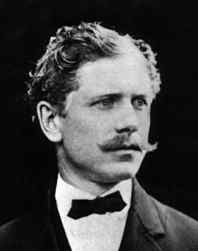
this guy is cool, i will give him that - check out this pic:


image from http://bierce.thefreelibrary.com/

dig that 'stache!! no wonder my brother likes this dude - he's got kinda a mark twainy feel about him. (another favorite author of el brando)

ok so on to the actual book - this book is split into 3 parts: part 1, bierce's horror stories. part 2, his war stories. part 3, his tall tales.

the best thing about old-timey horror stories is that they're nothing like today's scary shit! can't handle the hostels, the saw 1-2-3-4-however many of em there ares, the snakes on a planes? make way for the horror stylings of ambrose bierce, where every story reads like this!

"ok there was guy, see? and he was travelling through the woods one night - and he meets this mysterious stranger, and they start talking and it's just kinda strange! and then after they part ways and he gets where he's going, he later finds out HE WAS TALKING TO A GHOST!!!! WHOOOOOOOOOOOOOOOOOOOOOOOOOOOOOOOOOOOOOOOOOOOOOOOOOOOOOOOOOOOOOOOO!!!!!!"
(that's my scary ghost noise)

i gave this book a shot, i really did, but MAN this book could not hold my interest! and so, after my valientest of efforts, i gave in an gave up on this book about 119 pages into it. (it's 496 pages long).

so uh... i guess i don't really have anything else to say about it! lemme know if you wanna give ol' biercey a try and i'll send you my copy, maybe you'll fare better with it! first come first served! (remember i post my blog on a bunch of different sites, so be quick if ya want this book!)

ratings:
hearts: 2 heart - i am pretty sure this guy had a formula and it seemed to work for him cuz he wrote a ton of short stories!
farts: 3 farts - but MAN i could just not get into it!

Labels: ,

hearts and laserbeams how to: repeat yourself, repeat yourself part 4!

part 4: check yourself before you wreck yourself!

ok so you've got your repeat pattern finished in either illustrator or photoshop - the most important thing comes next, making sure your repeat works! spoonflower's a little spendy, so it would suck if you spent the money to get your fabric printed up and then got it in the mail all honked up with little chunks missing! in this last and final installment we'll go over how to check your repeat and make sure it works and get that shit ordered!

(ps sorry for the delay in writing this part folks! i have a new on-site freelance gig going on right now so i need to rework how my blogging goes so i can keep you elbow deep in fresh posts!)

so let's get to it!

photoshop instructions:

1) open the photoshop file we've been working with! first off we're going to group your repeat's layers together to make em easier to work with in checking your work.
in your layers window, click on the create new group button:


name this group "red polka dot". click on your top (a polka dot) layer, hold down shift and click on your red background layer. you should see all of your repeat layers selected now - drag them into that group folder.


2) now we'll make your canvas size a lot bigger so we can repeat this group and check to see if all the edges match up! using the menus up top, choose image > canvas size. enter 16 inches for both the x and y values, and then on the grid of squares click on the top left. click on ok.


3) next make a copy of your polka dot group! right-click on your group, and choose duplicate group. do this 2 more times, so you have a total of four groups - your original, and 3 copies.


4) select one of those groups, and from the top menus choose edit > free transform. just like before, make sure the little triangle in the options bar up top is dark (click to make it dark if it isn't), and then set the x value to 8 in and the y value to 0 in, then hit enter. one of your groups should have moved over!


5) select another one of the groups, choose edit > free transform, set the x value to 0 in and the y value to 8 in, hit enter. another one moved!


6) select another one of the groups, choose edit > free transform, set the x value to 8 in and the y value to 8 in, hit enter. you should now have a block full of dots!


7) at this point you should check to make sure all your edges of your repeat matches up where everything hits everything else - if you're doing a tossed pattern this is also a great time to check and make sure there's no weird holes in your design! if there's a problem you gotta go back and figure out what went wrong, but if everything looks good you're golden and ready to set up your file to order!

8) we're gonna go back to your file before you made all those copies with the magic of the history window! using the menus up top, select windows > history. what you'll see there is all the stuff you've done to this file for the last 10-15 steps! click on the item right before "canvas size". (grouping is nice, so no need to undo that!)


it should look like you're back to where you started!


9) save that shit!

10) now we'll save the file you'll upload to spoonflower. from the top menues, select file > save as. set your format to tiff, and UNCHECK the box that says layers. (layers will make your file HUGE!!!) and click save! then click ok! then you're almost done!

11) go to the folder where you saved your file and double check that it's less than 25 megabytes - if it's bigger than 25 megs and you've started with a file that's in lab color and 300dpi, don't fret! spoonflower's printers print at 150dpi. if you're having this problem, you can open your tiff file and go to image > image size. you can change the resolution to lower and lower increments to see how much smaller you can make the file, but DON'T GO BELOW 150 DPI!!!

AND THAT IS IT!! you've made a repeat in photoshop, saved the tiff and are ready to order from spoonflower! but what if you've created your file in illustrator?

illustrator instructions
(guess what, it takes a lot less work to check your file in illustrator!)

1) open the illustrator file you're working with. with the dark arrow at the top of the tools window selected, click on the red background. using the menus up top, choose edit > copy and then edit > paste in back. WITHOUT DESELECTING THIS SQUARE, change the fill and stroke to have no color. you shouldn't see any change on the screen because this square's behind everything else on the page AND it's color is essentially set to invisible!

2) making sure your dark arrow at the top of the tools window is selected, drag a box around your entire repeat. using the menus up top, choose windows > swatches. drag your repeat into this window.


3) you should now see a tiny swatch of your repeat in this window! hooray! in the tools window, select the rectangle tool. make sure your repeat swatch is selected in the swatches window - off to the side of your file, click on the screen. you should get a dialog box asking for dimensions. set both the x and y values to 16 inches.


4) voila! you should see a big ol chunk of your repeat! make sure all your elements are intact and there's no little chunks missing anywhere!


5) if it all looks good go ahead and delete that huge swatch so all you have left is your original repeat. looking at the menus up top, choose file > export. set where you'd like to save it and choose .tif for the file format, and hit ok. set the color to cmyk and the resolution to 300 dpi, make sure the box for anti-alias is checked and hit okay.

6) you're not quite done yet! now you're take this tiff and put it in the correct color format for spoonflower! it's no worries, super easy peasy - go into photoshop, open the tiff you just saved from illustrator. using the up top menus, choose image > mode > lab color.

7) save it! done! finito! go to the folder where you saved your file and double check that it's less than 25 megabytes - if it's bigger than 25 megs and your tiff is in lab color and 300dpi, don't fret! spoonflower's printers print at 150dpi. if you're having this problem, you can open your tiff file and go to image > image size. you can change the resolution to lower and lower increments to see how much smaller you can make the file, but DON'T GO BELOW 150 DPI!!!

AND THAT IS IT!! if you follow the four parts of this tutorial step by step you will be makin repeats like a madman in no time - hope they were super helpful to you; the next hearts and laserbeams how-to will be about creating animated gifs, wokka wokka doo doo yeah!

Labels: ,

3.23.2009

hearts and laserbeams how to: repeat yourself, repeat yourself part 3!

part 3: making a simple repeat pattern!

ok breaktime's over folks let's get back into it! today we're gonna talk about how to make a simple polka dot repeat in both photoshop and illustrator. you can apply this exact same technique to pretty much anything you want to repeat!

THE most important thing to remember when you're building your repeat is anything that cuts off on one side of your repeat's box MUST finish on the other side of your box.

let's take a look at that simple heart repeat from part 1:


note how the top heart ends right along the top left corner. now look to the right of that repeat box - the next heart starts exactly on the other side of the right edge. the lower heart inside the repeat box, see how it falls under that red box line just a little bit? take a look at the left side of the box - that heart also falls under that repeat's border, with that same little tiny slice of heart! make sense? no? (if not let me know and i'll explain again; not sure if that came across right.)

so any element that ends on the left side of the repeat box MUST finish on the right side of the repeat box. same thing for any element that ends at the top of the repeat box - it MUST finish at the bottom of the repeat box. take a look again at the multicolored hearts from part 1, it'll be a little clearer:


ok so we've got that part, right? and you've got your file set up - let's make a simple polka dot!

creating a polka dot in photoshop
1) open your file that you created in part 2 of this tutorial!


2) make a new layer called "polka dot 1". (see part 2 of this tutorial for how to make a new layer) make sure this layer is highlighted in the layers window so it's the layer you're putting this first dot on.

3) set your chosen foreground color to black - see where you set the color to red in part 2 for how to change it.

4) select the ellipticle marquee tool in your tools window (remember you can click on any of these images to see em bigger!):


5) now you'll make a dot on your page! holding down the shift key, left-click and drag a circle on your document. holding down the shift key locks the proportions into a perfect circle - you don't have to hold it down, but you most likely will get an oval and not a circle if you don't... you'll now see a blinking circle.

don't stress out over where to make your circle, these directions will work no matter where you put your circle. don't stress about how big to make it either, that's all up to you!

6) select your paintbucket (see part 2 for how to do this)

7) fill your blinking circle with black!


8) using the menus at the top of your screen, click select > deselect

9) ok now we'll make an exact copy of that dot in that exact spot on another layer! making sure you select your dot layer, click and drag it to the new layer icon at the bottom of the layers window.


you should now see a layer appear that is the same as the layer you copied - it'll have the word copy at the end of that layer's name:


10) make sure your newly-copied layer is highlighted in the layers window, and that the black arrow is selected from the top of the tools menu. you'll be moving the dot to a new position! from the menus at the top of the screen, pick edit > free transform. now look at the options bar at the top of your screen, and click the little triangle so that it's a dark grey color.


11) set the x value to 4 in and the y value to 4 in - you'll most likely have to put the "in" for inches after your numbers! watch your dot move; so magical!


now check out the above picture - our second dot is cut off! if this repeat was sent to spoonflower as is, you'd get your fabric back with one good dot and one dot that's missing a chunk. so! do this:

12) make a copy of that copy layer by clicking and dragging it to the new layer icon in the layers window. on the top layers menu, choose edit > free transform. making sure that triangle icon is dark grey, set your x value to -8 in and your y value to 0. you should now see a tiny chunk of circle on the other side of your 8" x 8" repeat!


and that's it! you've just made a repeat! let's check out how it's done in illustrator:

creating a polka dot in illustrator
1) open the illustrator file we created in part 2.

2) select the ellipse tool from the tools window.


3) set the foreground color to black (see part 2 for how to do this)

4) with the ellipse tool selected, click somewhere inside your red square - set the x and y values to 2" (or however big you want your dots to be).


hit ok, and you'll see a dot on your square!


now we're gonna make another one of those dots right on top of that one (just like copying that layer in the photoshop instructions). make sure the dot you made is still selected, and from the menus at the top of the screen choose edit > copy. then choose edit > paste in front.

you should not see anything change here, because the dot is right in front of the first one you made. it should still be selected! from the menus up top choose edit > transform > move. you'll get a popup box, and you should set the x value to 4 in and the y value to -4 in. if you click on the preview box, you'll see where it's going to move to! hit ok and it's moved!


in this example the dots are both contained inside the square. if your second dot is cut off on the side of the box though, its an easy fix! select that second dot, copy and paste it in front,and then move it, setting the x value to -8 in and the y value to 0. donezo!

if you want to move your dots so they're contained in the box, you can do that to - using the black arrow you'll just select dot 1, hold down shift and select dot 2 (shift lets you select multiple objects), and then move them to their new position! you just want to make sure your dots stay the same distance from each other or else your repeat won't be a standard polka dot (which may be what you're going for! in that case do whatever suits you!)

and that's it for now! we've created a repeat in photoshop and a repeat in illustrator - next i'll show you how to test them to see if they'll work as a repeat!

do you have any questions on this part of the tutorial? ask away, ill help ya out!

Labels: ,

3.21.2009

pics of dao's art show!

last night gayle and i drove down to laguna beach (which thanks to roller derby i cannot say without pronouncing it laguna beeyatch in my brain) to see our friend dao's pieces in an art show!

her pieces were really cool - kinetic art and more modern stuff generally doesn't hold my attention long but this stuff was neat because it actually had story and a point behind it, rather than "hey i was fuckin around with some stuff and made this thing waddaya think?"

P1050381

this one was really great - she strung together TONS of led lights and programmed them to re-create a photo of her father. when the lights in the room were out it looked like this, and when the lights in the room came back on the leds changed so that he was still recognizeable.

it's weird how my own art is just meant to be fun and fucking around and not too deep, but i want stories and pertinance in kinetic art... need to just let go and enjoy it i guess!

anyways, moral of the story is i really liked dao's stuff, and if you have a chance you should check it out while it's there:

skin deep
dao nguyen and richard hutter

march 17 - april 25
235 forest ave
laguna beach, ca 92651
(949) 497-1880

Labels: , , ,

la zoo pics!

lookit how tall i am!

ok i feel like i have about 20 billion things i'm working on simultaneously today, but i wanted to share some pics with you! josh and i went to the l.a. zoo last tuesday, and it turns out that when it's like 70 degrees and a weekday that's the best time for the zoo! it's not busy and all of the animals are out and it's totally sweet! click on the giraffe and take a look at all our rad pics - more blogging later today on a really cool art show gayle and i went to last night!

Labels: ,

3.19.2009

hearts and laserbeams how to: repeat yourself, repeat yourself part 2

part 2: setting up your file

but steeeeeeeeeph, when are we gonna make repeats!!! i wanna make repeats!!!

patience, grassplopper - the most important thing about getting ANYTHING printed, whether it's paper or fabric or your mother's face, the most important thing is setting your file up correctly from the start so you don't run into problems you have to fix later! this is important stuff! (if you wanna skip ahead though, don't read today. come back tomorrow when we start building repeats! and when you run into color problems later, don't come crying to me! :)

ok so let's get down to it - on my end i'm running photoshop cs3 and illustrator cs3 on my laptop pc. (don't tell any of my arty type friends... i dig how macs look but will always love pcs more) so i'll be writing these tutorials based on that. if you're not a graphics person and are not using these programs, i'm sure the info in these how-tos will still be useful, but you'll need to poke around your particular program a bit to do what i'm talking about. if you're looking at doing prints on fabrics a lot, i'd definitely recommend at the very least getting photoshop. there's a cheaper version called photoshop elements; while it doesn't have all the bells and whistles of a full version it does have all the basic stuff you'd need to do what i'm doing. so check that out! (also, incidentally, if you decide to get photoshop and illustrator and want to learn how to use em i totally recommend the classroom in a book series, it rocks!)

so should you create your repeat in illustrator or photoshop? that depends completely on the type of graphic you're creating. are you creating a repeat that's got very clean graphic lines, like a stripe, plaid, dot or cartoony type character? you'll wanna use illustrator to start with (but you'll switch to photoshop at the end when you're preparing the file to send). are you creating a repeat that's more arty, like something that looks handdrawn or painty, or even using a photo? you'll wanna use photoshop from the start.

keep in mind when you're making something for yourself, there's no right and wrong, it's all based on the following line of questioning: do you like it? yes? great you're on the right track. no? ok tweak it until you like it and there you go! that being said, for spoonflower you can make your repeat pretty much ANY size you want. 1" wide by 8" high, 3" wide by 1" high, the sky's the limit!

for the sake of explaining, i'm gonna say we're making a repeat that's 8" x 8". so do it! click on any of these screenshots for a bigger view!

photoshop file setup:
1) select file>new
2) you'll get a popup box. make sure you enter the info as follows (if you're making a repeat that's a different size you'll put in your own dimensions)


3) you'll have a file that looks like that checkerboard box:


4)let's say you're making a repeat with a red background. something that you need to keep in mind when you're creating your photoshop files is that layers are your friends - they'll keep everything separated so if you need to move something around it's quick and painless and fabulous! we'll make a new layer that's a red background, and you can change that color to whatever you want if you decide to make it something else later without causing yourself any grief!

so first make sure you can see your layers window. do this by going to the menu at the top of the screen, and go to windows > layers.

in your layers window, click on that little arrow pointing down with 3 horizontal lines next to it on the top left and choose "new layer".


give the layer a name that makes it easy to see what's on that layer and hit enter.


now we'll make that layer your red background! check out the tools window of photoshop - if it's not already open, you can get there from that top row of options and click window > tools. at the very bottom of the tools window you'll see two colored boxes. click on the top left one


you'll get a color picker window that'll pop up! you can play around with this as much as you want to get your particular shade, enter cmyk rgb or hex numbers, or you can click on the color libraries and pick a specific pantone color if you'd like! (click on the color libraries button to see all those options, and click on color picker to get back to the color wheel!)


so pick your color, hit "ok", and that little box of color in the tools window is now whatever color you picked!

this next part is easy, we're just gonna fill that background layer with your red and it's good to go! in photoshop cs3 the paintbucket is a tad hidden - click and hold on this gradient button, and the paintbucket will appear. then choose the paintbucket!


have your paintbucket selected? just click it on the background color layer and pow! file's ready for making a repeat!


*****

but steeeeeeeeeph, i'm gonna use illustrator! what do i do!

man you best calm down i'm getting to that!

illustrator file setup:

1) from that top menu, click file > new

2) give it a snazzy filename and hit ok! for this project, the page size doesn't matter. we're only using illustrator to create the file and will be exporting it as a tiff later. so don't change anything there!


3) layers aren't aaaaaaaaas important on the illustrator file because these are much simpler pieces to work with for the most part! so let's make your background square!

if your tools window in illustrator isn't open, click windows > tools.

you'll be clicking on this rectangle tool. if it doesn't show up but another shape is showing up in that spot, click and hold on that other shape and you'll see a box appear with more shapes to choose from - click on that rectangle or else!


4) click once in the middle of your page and you'll get this popup:


set the measurements to 8 inches by 8 inches and hit ok, and you'll see a box appear on your screen!


it almost never shows up exactly where you want it to - if that's the case (like pictured) you can choose that black arrow on the top of the tools window and move it wherever you'd like!

5) now we'll set the color - using that black arrow, click on the square you just created. if you don't already see a window called "color" on your screen, go to the windows menu at the top of the screen and choose color.


with that square you created selected, look at the color window - there's 2 colors to adjust. the outline color, and the fill color. set the outline color to none.


then click on the fill color and set it to whatever color you'd like, in this case we're usin a red. there's color sliders that you can play with in illustrator - if you'd like to use a particular pantone, you can go to windows > swatch libraries > color books and then pick whichever color standard you'd like!


and that's it! if you have any questions absolutely ask away! and stay tuned, next time we'll get into creating a simple repeat!

Labels: ,

3.18.2009

hearts and laserbeams how to: repeat yourself repeat yourself!

part 1: what the hell is a repeat!?!

ok it's been a LONNNNNNNG time since i've done a how to, and this one's a doozy! have you heard of spoonflower? it's this awesome website that lets you print your own fabric! only problem is, not everyone knows how to make a repeat pattern - hearts and laserbeams to the rescue! i'm working on a series of blog entries that'll have you ordering your own fabric in no time!


keep in mind - repeats aren't just for fabric! these same techniques can be used for creating website backgrounds and other stuff, too, so read on!

let's start at the beginning. before you start designing repeats, you gotta understand how to recognize them in their natural habitat! start looking at anything you've got that has some kind of art all over it - pillows, shirts, sheets, shower curtains, potholders - they're all common things to find em on! take a look:


clockwise from top left: plaid shorts from delias, vintage floral print dress from forever 21, floral pillow from target, paisley quilt and block leaf curtain from urban outfitters, wild side room set from delias, thai silk pillow from target, floral swing skirt from forever 21.

when you're in a store or even your own home, start paying attention to the patterns and figuring out where their borders are - once you start doing this you'll begin to get all kinds of ideas on how to create your own repeats!

so let's get started on a fairly easy repeat - check this out:


this repeat's made up of rows of hearts - here's where the edges of the repeat are:


so if you made a blue box with just two grey hearts in those positions, when you repeat it over and over you'd get tons of rows of hearts!

let's take a look at another one:


this one's almost the same, but it's got different colored hearts! what's a girl to do, can you spot where the box should be?


the repeat is a little bigger, because you've got hearts in different colors. but still pretty easy to pick out! what you're looking for in recognizing repeats is basically that - where can you draw a box (rectangular or square, doesn't matter) where the elements repeat equally over the surface of the fabric?

ready for a tricky one?


on something that looks more complicated, look for a large main element and then look for where that shows up again. i guaruntee if you do that you'll be able to pick it out. here's where the repeat box is!


once you start doing this more and more, you'll really start getting a better understanding of how repeats work and it'll make it so much easier for you to make your own! that's it for now, any questions? leave a comment!

stay tuned, cuz tomorrow we'll start talking about how to build repeat patterns!

Labels: ,